Before you start
Collecting signatures from two or more people usually means a paid e-signature service, or emailing a PDF around and hoping each person signs in the right place.
Raccoon's Request signatures works like DocuSign but needs no accounts and no server. The signing progress and audit trail travel inside the PDF itself, so you send it however you like: email, chat or a shared drive.
Step by step
- Open the documentGo to raccoonpdf.com/request-signatures and choose the PDF.
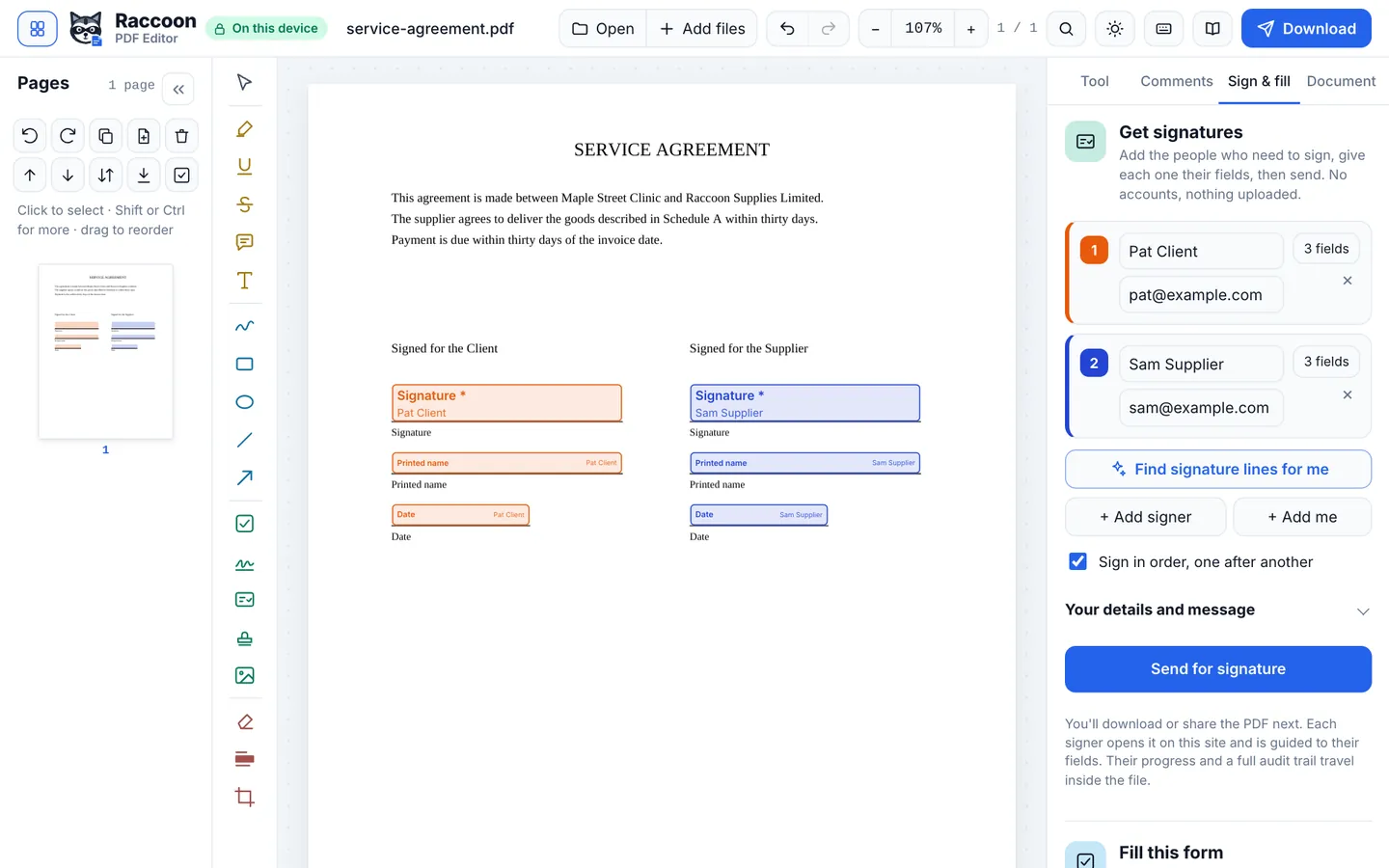
- Add the signersType each person's name and, if you like, their email. Turn on Sign in order if each person should sign after the one before.
- Place their fieldsPress Find signature lines for me to place signature, date and name fields automatically, or choose Add fields next to a signer and click the page. Each signer has their own colour.
- Send itPress Send for signature. Download the signing PDF or use Email to open your own email app with a message ready.
- Each person signsSigners open the PDF on raccoonpdf.com, agree to sign electronically, and are taken from field to field. They download the signed copy and pass it on, or send it back to you.
- Get the completed fileWhen the last person signs, Raccoon adds a certificate of completion page with the audit trail and seals the document so any later change is detectable.
Good to know
- Signing in person? After sending, choose Sign on this device now to let someone sign on your phone or computer.
- If you only need your own signature, the Sign tool is quicker.
- Keep the final sealed PDF. Opening it in Raccoon or Adobe Acrobat shows whether it has changed since it was signed.
Questions
Do signers need an account?
No. Nobody needs an account, including you.
How is this different from DocuSign?
DocuSign stores documents on its servers and charges per user. Raccoon keeps everything in the PDF and on people's devices, and it is free. DocuSign offers things Raccoon does not, such as ID verification, reminders sent for you, and integrations.
Is there an audit trail?
Yes. Each send, open, consent and signature is recorded with a time stamp and added to the certificate of completion.