Before you start
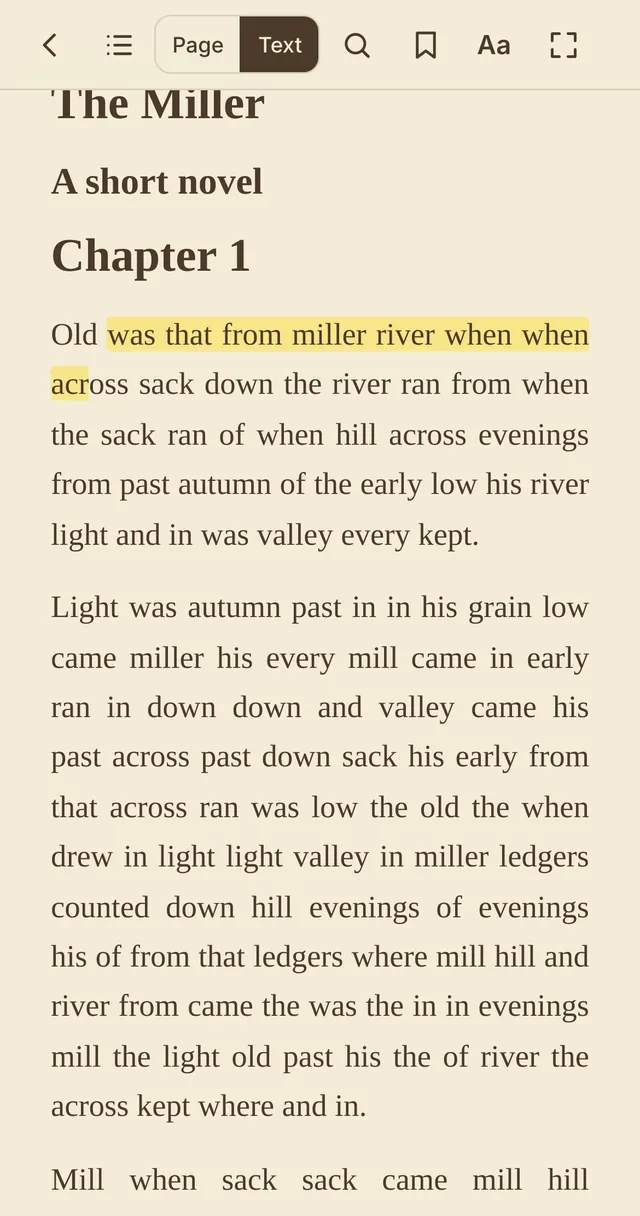
Books, reports and articles saved as PDFs are tiring on a small screen. Raccoon's reading mode gives you two ways to read: the original pages with smooth zoom, or a Text view that reflows the words to fit your phone, in the font and size you like.
Step by step
- Open the PDFGo to raccoonpdf.com/pdf-reader and choose the file. It opens straight into reading mode.
- Pick a viewPage shows the original layout. Text reflows the words like an e-book. Switch any time with the buttons at the top.
- Make it comfortableTap Aa to choose a theme (White, E-ink, Sepia, Green, Dark or Black), the font, text size and line spacing, and use the reading light sliders for brightness and warmth. In Page view, Fill screen trims the white margins.
- Turn pagesSwipe, or tap the left and right edges. Tap the middle to show or hide the controls.
- Highlight and take notesIn Text view, select words to highlight them in four colours, add a note, look a word up or search for it. Find everything later in Notes, and export it.
Good to know
- Raccoon remembers your page, bookmarks and highlights for each file on that device.
- Tap the footer to switch between time left in the chapter, time left in the book, page and location. The time estimate learns your reading speed.
Questions
Does Text view work for every PDF?
It works for PDFs with real text, such as books, articles and reports. Scans need OCR first, and complex layouts like magazines read best in Page view.
Are highlights saved in the PDF?
They are saved on your device for that file, like bookmarks, so they are there when you reopen it.
Is it free?
Yes, with no account and no ads.